Nine mechanical categories. 144 million MOT records. A clear picture of what this car's components are likely to need - before you even walk through the door.
What the Wear Guide tells you
Every car wears at a rate tied to its mileage. Brakes fade, tyres degrade, suspension components loosen - and MOT records show exactly when these things tend to start showing up, down to the specific part.
The Wear Guide tracks nine mechanical categories, split into the individual parts within them - pads and discs within Brakes, for example - using this car's own MOT history alongside national data from other examples of the same model and year. For any part that's already come up on this car, you see exactly when it was flagged and when it was fixed, plus this car's own replacement pattern if it's happened more than once. Where it hasn't come up yet, or hasn't recurred enough to show a pattern, the Wear Guide falls back to the national picture: when this model and year typically first needs attention.
If brake pads on this exact model and year typically first need attention by 71,000 miles nationally, and this car's at 90,000 with no pad history on record, the Wear Guide flags it - not because anything's confirmed wrong, but because it's already past where most similar cars needed a look. If the pads have already been replaced once and it happened at 30,000 miles, you'll see that instead - this car's own history takes priority over the national figure whenever there's enough of it.
Nine wear categories
Each category covers a distinct part of the vehicle that regularly appears in MOT advisory records. All nine are assessed independently for the car's mileage.
What you see for each category
Each category shows every part within it on its own timeline, plotted against mileage. Where a part has come up on this car, you'll see exactly when it was flagged and fixed. Where it's recurred more than once, you'll see this car's own pattern projected forward - a genuinely personal estimate, not a national average dressed up as one. Where it hasn't recurred enough to show a pattern, you'll see the national median instead: the mileage at which half of other examples of this exact model and year have needed the same part addressed, and half haven't.
A median isn't a guarantee and it isn't a floor. A car flagged well before the median isn't a data error - it's simply an earlier case within a distribution the median already accounts for. Nothing here is a pass/fail label; it's a comparison point.
A minimum of 2,000 MOT records is required before a national median is shown for any part. Below that, no comparison is shown rather than an unreliable one.
The data behind it
DVSA records from 2022 to 2024, covering every test across the UK vehicle fleet.
Each mapped independently against mileage thresholds derived from advisory frequency in the dataset.
Required per model, year, and part before a national comparison is shown. Less than this and no comparison is shown.
Source: DVSA, 2022-2024. Data reflects advisory frequency across vehicles sharing the same make, model, and fuel type.
What it looks like in your report
App screengrab
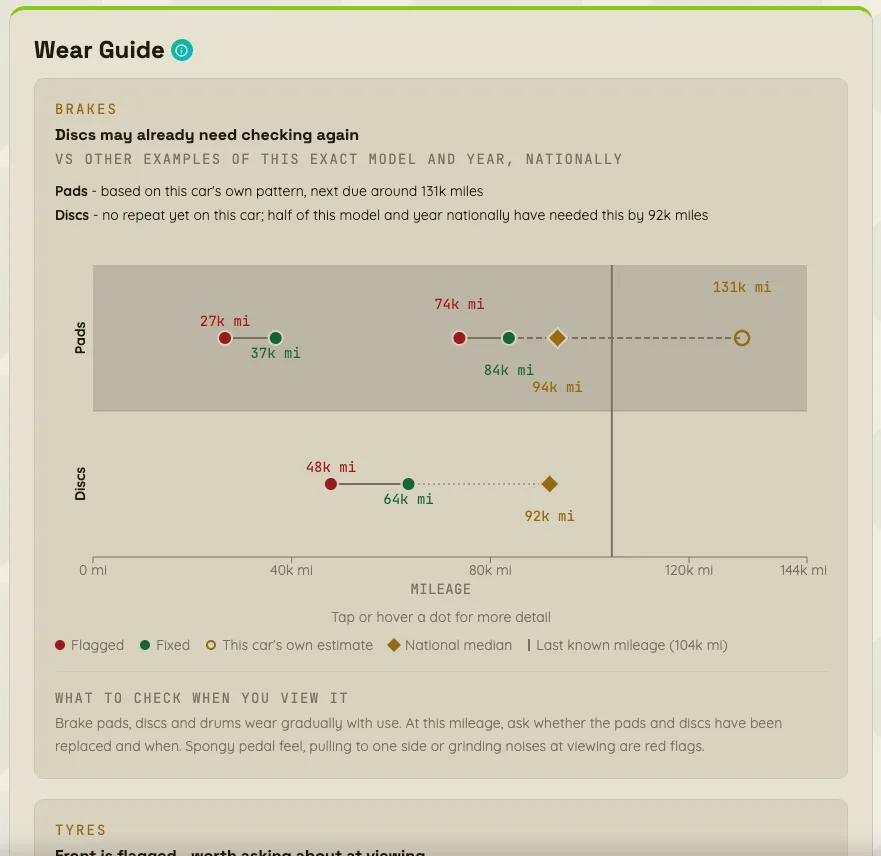
Each category breaks down into its individual parts, showing this car's own history alongside the national picture for cars of the same model and year - so you know exactly what's already happened, what's likely coming, and where to focus at the viewing.
How to use it
Before the viewing
Use the Wear Guide to build a targeted inspection list. If brakes and suspension are flagged at this mileage, arrive knowing what to ask about - what was the last service date, have the brake pads been replaced, when were the tyres last changed. Use the BIB viewing checklist alongside it.
At the viewing
Categories showing "Inspect closely" or "Prioritise at viewing" should inform where a mechanic's inspection focuses. These aren't pass or fail labels - they are statistical prompts based on what tends to go wrong at this stage of a car's life.
In price negotiation
Wear findings that are confirmed at the viewing become legitimate grounds for a price conversation. "3-in-4 cars this age have brake wear - has this been looked at?" is a more grounded question than a guess. It opens a discussion rather than an argument.
Why this is different
Other UK used car tools - HPI, AutoTrader, the DVSA's own checker - show the history of this car. They tell you what has happened. The Wear Guide is predictive: it tells you what is likely to need attention based on where this car sits in its life cycle.
History tells you the car passed its last MOT. The Wear Guide tells you that suspension bushes on cars of this exact model and year typically first need attention by a specific mileage - and shows you exactly where this car's own record sits against that, part by part. That's a different kind of intelligence - and it's the one that matters when you're deciding whether to buy.
BIB is the only UK tool that correlates component-level wear data with mileage across the DVSA dataset to produce predictive advisory thresholds at this level of detail.
What it doesn't tell you
Limitations
It reflects population averages
The Wear Guide is based on how cars like this have behaved historically - not what has happened to this specific car. A well-maintained example may be in better condition than the data suggests. An abused one may be in worse shape. Use it as a prompt, not a verdict.
Wear shows up at MOT, not when it happens
The data captures advisories at MOT time, which may be months after the underlying wear developed. The thresholds reflect when issues are officially recorded - actual wear onset could be earlier.
Low-volume models may not have results
If fewer than 2,000 MOT records exist for a specific part on this exact model and year, BIB hides the national comparison for that part rather than show something unreliable. Specialist, rare, or recently introduced models may show this car's own history without a national comparison alongside it, for some parts.
What this means for you
A part with no history yet, sitting below the national median, isn't a guarantee of good condition - it just hasn't shown up in the record. A part already past where most similar cars needed attention isn't confirmation of a fault - it means the data says this is a sensible thing to ask about. Treat the Wear Guide as a structured starting point for a more informed viewing, not a substitute for a physical inspection.
See the Wear Guide for any car
One of 13 intelligence sections in every BIB report. £3 per car.
Open BIB